
Your Jira Backlog Deserves INVEST-Quality Stories
agilekoc Jira Asistan is a Chrome extension that reads the open Jira issue, scores it against all 6 INVEST criteria using AI, rewrites it to meet the standard, and updates Jira in one click — without leaving the page.
Currently Turkish only. English interface and AI responses are on the roadmap. Sign up below — English-speaking users who register early will be prioritised for the English beta.
No spam. Unsubscribe anytime.
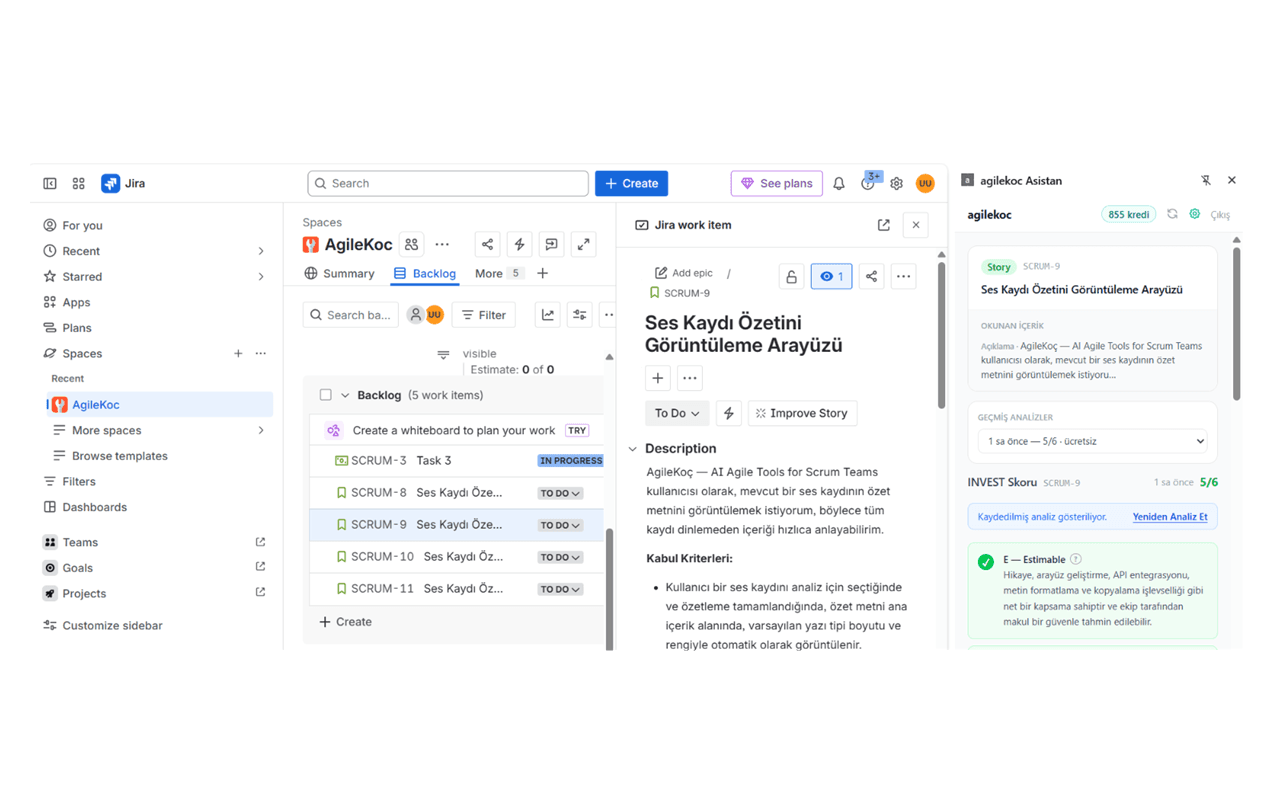
INVEST (Independent, Negotiable, Valuable, Estimable, Small, Testable) is the industry-standard checklist for user story quality, introduced by Bill Wake in 2003. A story that fails even one criterion typically causes estimation errors, incomplete deliveries, or sprint carryover. Most teams know the acronym but lack a fast, consistent way to apply it — that's exactly what this extension solves.
How it works
From issue to INVEST in under 30 seconds
Open a Jira Issue
Navigate to any user story, feature, or task on Atlassian Cloud. The extension activates automatically on *.atlassian.net pages.
Open the Side Panel
Click the agilekoc icon in the browser's side panel or use the Chrome toolbar. Log in once with your agilekoc.com account.
Analyze & Apply
Press "Analyze with INVEST." See the score, explanation, and rewritten story in seconds. Update the Jira issue or create split stories in one click.
Features
Everything you need, inside Jira
INVEST Score per Criterion
Every story gets a pass/fail verdict for each of the 6 INVEST criteria with a plain-language explanation. See exactly where it falls short, not just a total score.
AI Rewrite with Acceptance Criteria
The AI rewrites the story title, description, and acceptance criteria to meet INVEST standards — not just a summary, a ready-to-use story.
Smart Story Splitting
When a story is too large (violates the S criterion), the AI splits it into independent, delivery-ready pieces. The original Jira issue is updated; new issues are created and linked automatically.
Analysis History & Free Re-Analysis
Every analysis is saved per issue. Switch between past analyses with a dropdown. Re-analyzing the same issue after updates is always free — you only pay for the first pass.
Who is it for
Built for the people who own the backlog
Product Owners
Write and refine stories faster. Catch quality issues before sprint planning.
Scrum Masters
Coach your team on INVEST without a lecture. Show the score, not the rule.
Business Analysts
Validate user stories against a consistent, objective standard before they hit the backlog.
Questions
Frequently asked questions
What are INVEST criteria for user stories?
INVEST is a framework developed by Bill Wake that defines 6 characteristics of a well-formed user story: Independent (can be delivered alone), Negotiable (details can be discussed), Valuable (delivers measurable value), Estimable (team can size it), Small (fits in a sprint), and Testable (has verifiable acceptance criteria). Stories that fail INVEST tend to cause scope creep, estimation failures, and missed sprint goals.
How do I install the agilekoc Jira Asistan Chrome extension?
Once available on the Chrome Web Store, installation is two steps: (1) Click 'Add to Chrome' on the store page. (2) Sign in with your agilekoc.com account in the side panel. The extension activates automatically whenever you open a Jira issue page on Atlassian Cloud (*.atlassian.net).
How many credits does a Jira INVEST analysis use?
The first analysis of each Jira issue costs 15 credits. Re-analyzing the same issue after you update it is always free — you only pay for the first pass. New agilekoc.com accounts start with 50 free credits, enough for 3 full analyses with no card required.
Does it work with Jira Cloud, Server, and Data Center?
Currently the extension supports Atlassian Cloud (*.atlassian.net). Jira Server and Data Center support is on the roadmap. Sign up to be notified when support expands.
Are my Jira credentials stored securely?
Your Jira email and API token are stored only in your own browser using chrome.storage.local — the standard Chrome extension secure storage. They are never sent to agilekoc.com servers. Only the issue content (title, description, acceptance criteria) is sent to the API for AI analysis.
When will the extension be available on the Chrome Web Store?
The extension is currently going through Chrome Web Store review. Sign up above and you'll get an email the moment it's live — no need to keep checking.
Is the extension available in English?
The current version of agilekoc Jira Asistan is Turkish only — the interface, AI analysis, and rewritten stories are all in Turkish. An English version is planned and will be prioritised based on demand. If you'd like English support, sign up above and mention it: early English-speaking registrants will be the first to access the English beta.
Be the first to know when it launches
The extension is currently in Chrome Web Store review. Leave your email and we'll notify you the moment it goes live — no spam, no newsletters you didn't ask for.
No spam. Unsubscribe anytime.