
Write your raw thought.
AI makes it constructive.
From 1-on-1s to retrospectives, performance reviews to code reviews, your AI assistant for all feedback processes.
- 3
- Tone options
- 🪙5
- Per feedback
- 🪙50
- Signup bonus
- 2
- Languages
Feedback Assistant is an AI writing tool for professional feedback. It transforms your raw notes into constructive, tone-calibrated feedback messages — in Turkish or English.
The challenge
Why Is Giving Feedback Hard?
Saying the right thing isn't enough—you need to say it the right way.
Adjusting Tone Takes Time
Finding language that's constructive yet sincere, clear yet respectful consumes more energy than you think.
Wrong Phrasing Can Damage Relationships
The same message with different wording creates completely different impacts. AI helps you find that balance.
Context Can Get Lost
Feedback written in emails or messages can sometimes feel unclear, incomplete, or harsh.
Accumulated Feedback Explodes
Feedback you postpone with "I'll say it later" accumulates and comes out too harshly.
Step by step
How to Use?
Create constructive feedback in 3 steps.
Write Context and Raw Thoughts
Write your role, situation, and the feedback you want to give as is. Optionally upload a screenshot, AI reads from the form automatically.
Choose Tone
Select one of the tone options: Constructive (supportive), Neutral (balanced), or Direct (straightforward).
Let AI Create Constructive Version
AI analyzes context, tone, and message to create professional, respectful, and effective feedback. Also shows why it wrote that way (Rationale).
See it in action
What Does It Look Like?
How is the same thought expressed with different tones?
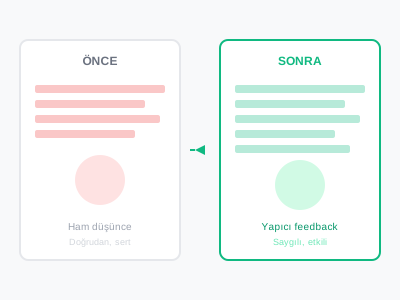
Before and After
Write your raw thoughts, let AI create the constructive version.
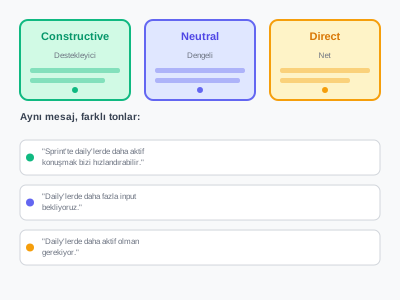
Tone Options
Express the same message differently with Constructive, Neutral, or Direct tone options.
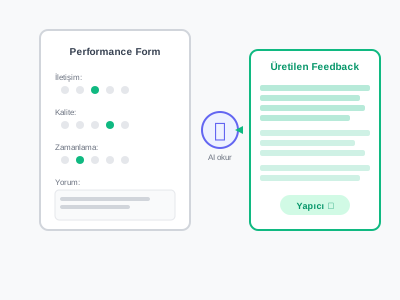
Visual Support
Upload screenshots, AI automatically reads scores and comments from forms to generate feedback.
How AI helps
How Does Your AI Assistant Help?
Transform raw thoughts into professional, constructive, and effective feedback.
What it does
Features
Context-Aware
Specify work situation, project, or team dynamics, AI uses appropriate language accordingly.
Tone Options
Deliver your message as you want with Constructive (supportive), Neutral (balanced), or Direct (straightforward) tone options.
Visual Reading (Screenshot)
Upload screenshots of Google Forms, Excel, or any form, AI automatically reads scores and comments.
Rationale (Explanation)
AI explains why it wrote that way, helping you learn. Improve your feedback skills.
History
Save previous feedback, use as reference, build a consistent communication style.
Fast and Secure
Generate feedback instantly with 5 🪙. All data encrypted, private to you only.
Who it's for
Who should use Feedback Assistant?
For anyone who needs to give feedback.
Scrum Masters & Agile Coaches
Give constructive feedback to team members after sprint retros, in 1-on-1s, or during performance reviews.
Team Leads & Managers
Provide growth-oriented feedback to team members, maintain relationship quality.
HR Professionals
Create fair, constructive, and professional feedback during performance review periods.
Product Owners
Build clear and respectful messages with stakeholders, developers, and customers.
Developers
Write constructive comments in code reviews, strengthen team communication.
Everyone
Anyone who wants to improve communication skills, speak more effectively, and enhance relationship quality.
Where to use it
Use Cases
Where can you use the feedback assistant?
After Sprint Retrospective
Instead of "There was a communication gap in the sprint," say "Being more active in dailies could speed us up during the sprint."
1-on-1 Meeting Preparation
Instead of "Your code quality is low," say "Test coverage in recent PRs is low, how can we improve this together?"
Performance Review
Instead of "You're missing deadlines," say "We can strengthen deadline management by improving planning accuracy in the last 3 sprints."
Code Review Comments
Instead of "This code is bad," say "This function seems a bit complex, could we break it into smaller parts?"
Peer Feedback (360 Degree)
Upload form screenshots, AI reads scores and generates constructive comments.
Free PDF
Use a better feedback prep flow
If you need a simple structure before writing or sending feedback, get the preparation kit by email.
Free PDF
Feedback Preparation Kit - Free PDF
3 fill-in templates: SBI preparation form, 7 pre-feedback checks, and 12 tough conversation openers.
- 1SBI preparation form
- 27 checklist questions
- 312 opening lines
No spam. Unsubscribe anytime.
Pricing
Pricing
Pay only for what you use with the credit system.
Per feedback
🪙5
Screenshot reading or long texts don't require extra cost. Every feedback costs 5 🪙.
Signup bonus
🪙50
= 10 feedbacks free on signup
What credits actually buy
20 feedback rewrites
60 feedback rewrites
200 feedback rewrites
Questions
Frequently asked questions
How much does AI change my feedback?
AI preserves your message while improving tone and phrasing. The core idea and content remain yours; AI just makes it more constructive, respectful, and effective.
How does visual support work?
You can upload a screenshot of Google Forms, Excel, or any feedback form. AI reads the image, detects criteria ratings and comments, then transforms them into constructive feedback text. Form reading requires no extra credit.
What's the difference between tones?
Constructive: Softest and most supportive. Growth-focused, positive language. Neutral: Balanced and professional. Neither too warm nor too cold. Direct: Clear and straightforward. No unnecessary softening, but still respectful.
Is my data secure?
Yes. All feedback texts are encrypted and only accessible by you. Your history is private, never shared with anyone. You can delete history anytime.
How many feedbacks can I write?
Each feedback costs 5 credits. When you sign up for free, you get 50 credits, which means 10 feedbacks. For more credits, you can buy packs from the Pricing page.
Which languages are supported?
Both Turkish and English are supported. When you change the interface language, AI generates feedback in that language. Visual reading works in both languages.
What's the purpose of Rationale?
AI explains why it wrote the feedback that way. Which words it changed, why it chose this tone, which phrases it softened, etc. This way, you don't just use it—you also improve your feedback skills.
How can I use it in 1-1 meetings?
Before the meeting, write the feedback you want to give, add context (e.g., 'Sprint performance', 'Team communication'), choose tone, and let AI create the professional version. Use this text as a reference during the meeting for more confident communication.
Write Your First Constructive Feedback Now
Start using your feedback assistant with 50 🪙 free credits.
Free credits on signup · No credit card required